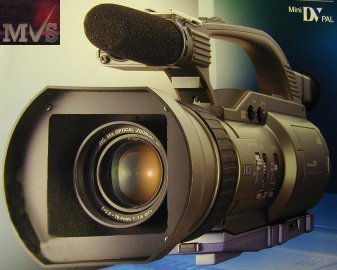
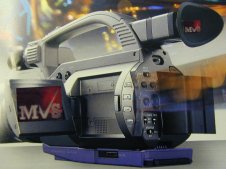
JVC GY-DV300E / GY-DV301E
Built to meet the needs
of today’s broadband information distribution networks, JVC’s new GY-DV300E / GY-DV301E
“Streamcorder” is the
ideal choice for “webcasting”.
This high quality 1/3-inch 3-CCD camera besides boasting powerful 12-bit A/D conversion
with 12-bit digital signal processing, high quality MiniDV recording and professional
functions, also comes fully equipped for connection to the Internet. This video can be
distributed in real time over the World Wide Web or local intranets, and so be viewed on
remote PC's around the globe.
Of course, it is not restricted just to live image distribution. This camcorder can also
save image data simultaneously on a MiniDV
cassette while recording to Compact Flash memory card, which can then be physically
transferred to an NLE system for digital editing and processing.
It all adds up to today’s most complete and versatile professional camcorder.
From ENG operation to self-operated studio, the new GY-DV300E
/ GY-DV301E is setting a new standard for video production
and distribution in the broadband era.
Real-time MPEG4 Streaming Capability ideal for live
Webcasts
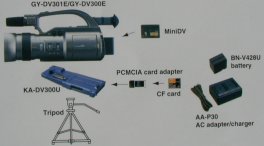
Just attach the KA-DV300U network pack to the base of the GY-DV300E /
GY-DV301E, install the PCMCIA card, and the camcorder is
ready for connection to the Internet via a personal computer.
LAN connection can be via LAN cable or wireless RF LAN card
As the GY-DV300E / GY-DV301E
captures images, it automatically generates MPEG4 files that are sent to the Internet in
real time. Viewers can see those streams in real time simply by accessing the specified IP
address on their PC. Ideal for any type of live event weddings, concerts, conferences
and even news reports.
The GY-DV-300E / GY-DV301E sends
your images around the world instantly. Economical and easy to set up, the GY-DV300E / GY-DV301E makes it easy for
students to attend lectures via the Internet.
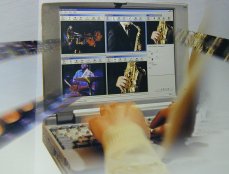
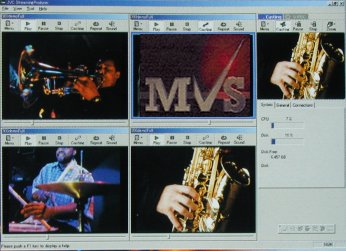
Streaming software ("Streamproducer") is provided with the KA-DV300U, allowing up to four GY-DV300E / GY-DV301E's to be connected to a
single PC and switched them as required before streaming.
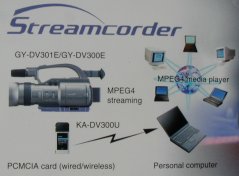
Basic Streaming System |
 |
 |
 |
Create a Publishing Point for
Distribution
Images and sound captured with the GY-DV300E / GY-DV301E's can be streamed as
MPEG4 tiles via the PCMCIA card to the PC. The MPEG4 tiles are then processed by
Streamproducer and made available for viewing on the Internet.
When viewers access the publishing point IP address, they can play back the MPEG4 files
with the Media Player on their PC. Streams of up to 15 fps (352 x 288) are assured.
Powerful 3-CCD Imaging, 12-bit ABC, 12-bit DSP and 14x zoom lens combine to give superior performance
| 3-CCD prism camera for high quality picture | |
 |
To ensure the best possible image quality, the GY-DV300E / GY-DV301E incorporates three
1/3" CCDs each of 470,000 pixels (440,000 effective). Each CCD attaches to highly advanced circuitry which virtually eliminates vertical smear when shooting bright lights in a dark room. Lag and image burn are also reduced to indiscernible levels while high sensitivity (F11 at 2000 lux) assures creative flexibility and simplifies lighting requirements |
| Newly developed 12-bit ADC* and 12-bit DSP** | |
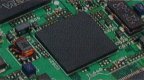 |
The 12-bit ADC directly inputs to the
DSP, thus eliminating any signal degradation otherwise arising from the analogue pre-gain
and pre-knee circuits. In addition, JVC's new DSP with advanced 12-bit video processing brings out all the natural details, eliminates noise, and gives good gamma response and so reproduces clear detail from dark areas. *ADC: Analogue Digital Converter **DSP: Digital Signal Processor |
| 400% Dynamic
Range An ultra-smooth gamma curve, calculated with a true log scale algorithm, produces a dynamic range of 400%, thus giving totally accurate reproduction of fine details and subtle colours right across the picture, including any shadowed or highlighted areas. |
|
| 14x zoom lens Both auto and manual control of focus and iris are available. The handle zoom speed can be adjusted and the large diameter focus ring ensures smooth, accurate focusing. An optical image stabiliser (inner focus) helps stabilise images, especially zoomed-in close-ups. |
|
| LOLUX 2.65 lux (100% video out) | |
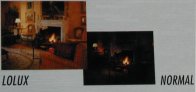 |
When activated, the LOLUX mode increases sensitivity with almost zero increase in noise. LOLUX increases the gain by 16x (+24 dB) so you can capture high quality video footage with excellent colour balance in low-light conditions. |
| Optical Image Stabiliser | |
| To minimise jittery images when shooting with the handhold GY-DV300E / GY-DV301E, an optical mage stabiliser can be switched in. | |
| AE (automatic exposure) function | |
| Brightness is managed automatically by a combination of the gain, shutter speed and iris control. | |
| Full auto shooting | |
| With the GY-DV300E / GY-DV301E set to Auto the shutter
speed, gain, white balance, audio record level and optional image stabiliser all
automatically self-adjust according to the shooting conditions. Picture quality can be adjusted manually, with individual settings available for master black, detail, DTL frequency, V resolution, auto knee, black and colour matrix. |
|
| Widescreen (letterbox) and 4:3 aspect ratios | |
| The screen can be switched between 4:3 and widescreen, allowing signals to be recorded in the desired aspect ratio. | |
| Wide-angle and telephoto lens converters | |
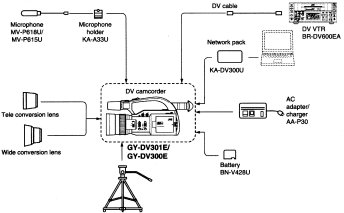
| For telephoto and wide-angle shooting, without sacrificing lens performance, telephoto and wide-angle lens converter accessories are available | |
| One-push auto focus and one-push auto iris | |
| When the focus or iris switch is set to MANUAL, the Auto Focus mode or Auto Iris mode can be engaged by pressing & holding the PUSH AUTO FOCUS or PUSH AUTO IRIS button | |
| Cinema Gamma | |
| An S Shaped gamma curve
mode can be selected which gradually changes gradations in the areas of dark and
high-brightness. This will provide film-like colour gradations in the recorded images. |
|
Reliable Recording System for high quality MiniDV pictures and PCM audio |
|
| MiniDV recording system with SP and LP mode | |
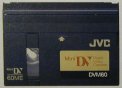 |
The GY-DV300E
/ GY-DV301E combines the convenience and affordability of
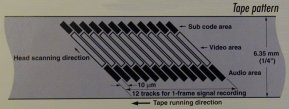
MiniDV with the high-qualify camera performance needed for professional use. Upto 80 minutes* of high-qualify 8-bit, 13.5 MHz, 4:2:0 DV component digital images can be recorded on a single MiniDV tape, assuring high quality, non-degradable images needed for top results in post-production editing, Impressive horizontal resolution of 500 lines is achieved when signals are played back via DV output. The high-qualify SP mode and up to 90-minute ** recording LP mode are also available, depending on your requirements. * With an M-DV80 tape ** The LP mode can be used only with a tape of 63 minutes duration or less. |
| Blank Search | |
| An unrecorded section of the tape, such as at the end point of a recording, is detected. The GY-DV300E / GY-DV301E enters the Stop mode at that point. | |
|
|
| Audio Recording Level Adjust | |
| Audio recording level can
be adjusted to minimise extraneous noise picked up by the microphone. Audio recording levels for channels 1 and 2 can be set either manually or automatically. |
|
|
High-quality PCM audio To complement the superior pictures, the GY-DV300E
/ GY-DV301E offers outstanding digital PCM sound. |
| EBU Time Code Generator | |
| An EBU-standard time code generator provides accuracy in editing. The time code system is locked to the REC RUN mode or re-generation mode. EBU time code can be preset at the beginning of the tape. | |
| Edit Search | |
| Edit points can be quickly accessed in the Standby mode for review or to set the start point for recording. | |
Versatile, User-Friendly Design with Professional Functions |
|
| Lightweight Ergonomic Design | |
This
handheld camcorder weighs only 1.4 kg giving the flexibility and mobility needed for any
type of application. The ergonomic design makes operation easier, allowing rapid reaction
shooting in any Situation. |
|
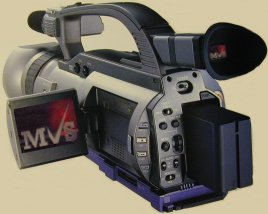 |
2.5-inch LCD display The 200,000-pixel 2.5" colour TFT LCD monitor provides a high-resolution 440 TVL image during shooting or instant replay. It has adjustable peaking and zebras. Time, status, mode and other information is also displayed. The monitor tilts up 180 degrees for high-angled overhead shooting and tilts 90 degrees for low-angle shots. |
| Easy Set-Up and Control Via Clear and Logical Menu Screens | |
| The Convenient menu system allows rapid, easy set-up via the camcorder's own LCD display or viewfinder, or via an external monitor. | |
| 0.44-inch LCD Colour Viewfinder | |
| The high-resolution
viewfinder shows the subject in full colour making it easy to locate & compose the
subject with the LCD panel still closed. Because the angle of the viewfinder can be adjusted it is easy to follow a moving subject. For low-angle shooting the viewfinder can be raised up by 70 degrees. |
|
| DV (IEEE 1394) Connector | |
This allows
transfer of a high-quality compressed digital motion picture signal to a computer, D9
decks, a non- linear editing system or to another DV recorder |
|
|
|
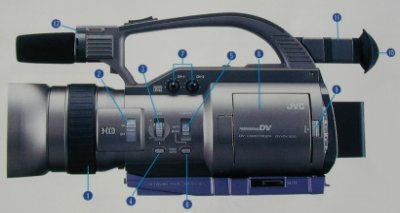
| Right side section 1 Focus ring 2 [ND FILTER] switch 3 [IRIS] adjust dial 4 [IRIS PUSH AUTO] button 5 [FOCUS] switch 6 [FOCUS PUSH AUTO] button 7 [CH1/CH2 AUDIO LEVEL] controls 8 LCD door 9 LCD door lock release knob 10 Viewfinder 11 Viewfinder video angle adjust knob 12 Rec tally lamp |
|
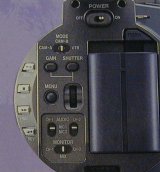
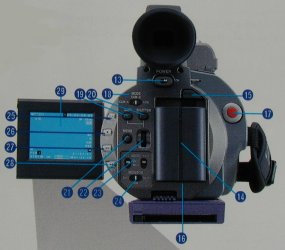
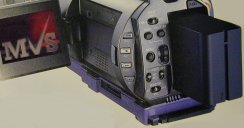
| Rear 13 [POWER] switch 14 Battery installation section 15 Battery lock release button 16 [DC INPUT] connector (visible when the battery is detached) 17 Rec start/stop button 18 [MODE] select switch 19 [GAIN] select button 20 [SHUTTER] select button 21 [MENU] button 22 [SELECT] dial 23 [CH-1/CH-2 AUDIO] input select button 24 [MONITOR] button 25 [BAR] colour bar/playbackstill button 26 [AW] auto white/stop button 27 [FWD] forward/FF button 28 [REW] reverse/REW button 29 LCD display 30 Built-in speaker |
|
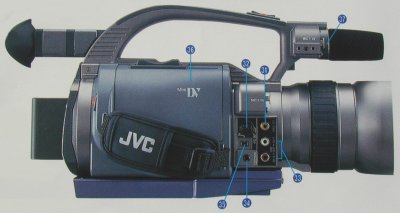
| Left side section 31 [VIDEO OUT] connector (RCA) 32 [Y/C OUT] connector 33 [CH-1/CH-2 AUDIO OUT] connectors 34 [EARPHONE] jack 35 [DV] 4-pin connector 36 Cassette cover 37 Microphone holder installation base |
|
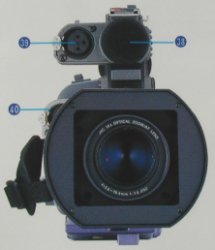
| Front 38 Built-in microphone 39 [MIC1] input connector (XLR-3P) 40 [MIC2] input connector (XLR-3P) |
|
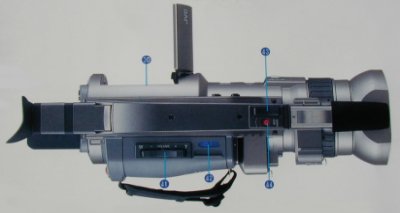
| Upper section 41 Zoom/playback sound level adjust ever 42 [EJECT] switch 43 [ZOOM] lever 44 [START/STOP] Recording start/stop button |
|
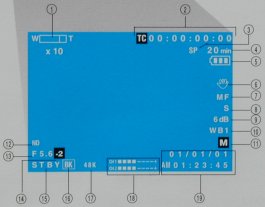
| LCD Display 1 Zoom magnification 2 Time code indication 3 Record mode indicator 4 Tape remaining time indication 5 Battery remaining time indication 6 Optical image stabiliser indicator 7 Manual focus 8 Manual shutter mode indicator 9 Manual gain mode indication 10 Manual white balance mode indication 11 Shooting mode indication 12 Filter indicator 13 Iris F number 14 Iris correction value indication 15 VTR mode indication 16 Fade indication 17 Audio sampling frequency indication 18 Audio level meter indicator 19 Date/time indication |
|
| System Configuration | |
|
|
| Specifications | |
| General | |
| Power requirement: | DC 7.2 V to 12 V |
| Power consumption: | Approx. 10W (in the Record mode) |
| Dimensions: | 357 (W) x 159 (H) x 130 (D) mm |
| Weight: | 1.4 kg (3.09 lbs.) (without battery) |
| Temperature | Operating: 0oC to 40oC (32oF
to 104oF) Storage: 20oC to 60oC (-4oF to 140oF) |
| Humidity | Operating: 30% to 80% RH Storage: 85% RH or less |
| Camera Section | |
| Image pickup device: | 1/3" interline-transfer CCD x3 |
| Colour separation optical system: | F1.6, 3-colour separation prism |
| Total number of pixels: | 470,000 795 (H) x 596 (V) |
| Number of effective pixels: | 440,000 752 (H) x 582 (V) |
| Colour system: | PAL - wide-band R-Y, B-Y encoder |
| Colour bars: | EBU type |
| Sync system: | Internal sync (built-in SSG) |
| Lens magnification: | 14x (optical) |
| Optical filter: | 1/32ND |
| Sensitivity: | F11, 2000 lux |
| Minimum illumination: | 2.65 lux, LOLUX (100% video out) |
| Horizontal resolution: | 700 TV lines |
| Gain: | -3 to 18dB (1 dB-step), variable gain (0.2 dB-step) in ALC and LOLUX (24 dB) |
| Electronic shutter: | 1/120, 1/250, 1/500, 1/1000, 1/2000, variable (ALC) |
| Variable scan: | 50.1 to 2067.8 Hz |
| Contour correction: | Horizontal and vertical dual-edged |
| Lens Section | |
| Focus length: | f = 5.6 mm to 78.4 mm |
| Maximum diameter ratio: | 1: 1.6 (wide) to 1: 2.8 (tele) |
| Shortest shooting distance: | Max. 1.0 m |
| Swaying correction range: | ±0.3 Degrees |
| Filter diameter: | 52 mm |
| VTR Section | |
| Format: | DV format, SD specifications |
| Signal format: | PAL |
| DV in/Out resolution: | 540 TV lines |
| Usable tape: | MiniDV tape |
| Tape speed: | 18.831 mm/sec. (SF mode), 12.568 mm/s (LP mode) |
| Record/play time: | 60 minutes (with an M-DV6OME tape in SF mode), 90 minutes (with an M-DV6OME tape in LP mode) |
| FF/rewind time: | Appros. 2 mm. (with an M-DV6OME tape) |
| Time code: | Drop, rec run, regeneration, preset (the beginning of the tape only) |
| Video | |
| Video signal recording format: | 8-bit, 13.5 MHz, 4:2:0 component recording |
| Audio | |
| Audio signal recording format: | 16-bit, 48 kHz PCM for 2 channels or 12-bit, 32 kHz PCM for 4 channels (recording only for 2 channels) |
| Dynamic range: | 71 dB or more |
| Connectors | |
| Video output: | 1.0V(p-p), 75 ohms, unbalanced (BNC) (composite video signal) |
| Y/C output: | Y; 1V (p-p), 75 ohms, unbalanced C; 0.3V (p-p), 75 ohms, unbalanced (4-pin) |
| Microphone input: | -60 dBs, 3 kohms, balanced, +48 V output for phantom power supply |
| Audio outputs: | -8 dBs, low impedance, unbalanced (RCA) |
| Earphone jack: | -60 dBs to -28 dBs, 8-ohm impedance (monaural sound mini-jack) |
| DV (IEEE 1394) | 4-pin |
| GY-DV301E | DV input/output |
| GY-DV300E: | DV output only |
| Built-in microphone: | uni-directional, sensitivity of -40 dBs |
| GY-DV300E | Discontinued |
| GY-DV301E | Discontinued |
KA-DV300U Network Pack |
Discontinued |
Plus VAT |
|
| Other Options Available | |
We supply JVC's full range of equipment & Spares, email or phone with requirements.